 702aafd603
Updated instructions for 64-bit 3DES ECB encryption and modified the table headers accordingly.
33 KiB

Lab 2: Symmetric Key
Objective: The key objective of this lab is to understand the range of symmetric key methods used within symmetric key encryption. We will introduce block ciphers, stream ciphers and padding. The key tools used include OpenSSL, Python and JavaScript. You can either use the Ubuntu instance or the one you have created within AWS.
Lab Demo: here
Sample answers: here
You can complete:
Part 1: Standard Lab
A Symmetric Key
| No | Description | Result |
|---|---|---|
| Log into vSoC 2, and select your Ubuntu host (or your own AWS EC2 instance or virtual machine). | What is your IP address? | |
| 1 | Use: openssl list -cipher-commands |
Outline five encryption methods that are supported: |
Use: openssl version |
Outline the version of OpenSSL: | |
| 2 | Using openssl and the command in the form: openssl prime -hex 1111 |
Check if the following are prime numbers: 42 [Yes][No] 1421 [Yes][No] |
| 3 | Now create a file named myfile.txt (either use nano or another editor). Next. encrypt with aes-256-cbc openssl enc -aes-256-cbc -in myfile.txt -out encrypted.bin -pbkdf2 and enter your password. |
Use the following command to view the output file: cat encrypted.bin Is it easy to write out or transmit the output: [Yes][No]. What does the -pbkdf2 part do? |
| 4 | Now repeat the previous command and add the –base64 option. openssl enc -aes-256-cbc -in myfile.txt -out encrypted.bin –base64 -pbkdf2 |
Use the following command to view the output file: cat encrypted.bin Is it easy to write out or transmit the output: [Yes][No] |
| 5 | Now repeat the previous command and observe the encrypted output. openssl enc -aes-256-cbc -in myfile.txt -out encrypted.bin –base64 -pbkdf2 |
Has the output changed? [Yes][No] Why has it changed? |
| 6 | Now let’s decrypt the encrypted file with the correct format: openssl enc -d -aes-256-cbc -in encrypted.bin -pass pass:napier -base64 -pbkdf2 Has the output been decrypted correctly? |
What happens when you use the wrong password? |
| 7 | If you are working in the lab, now give your secret passphrase to your neighbour, and get them to encrypt a secret message for you. To receive a file, you listen on a given port (such as Port 1234) nc -l -p 1234 > enc.bin And then send to a given IP address with: nc -w 3 [IP] 1234 < enc.bin |
Did you manage to decrypt their message? [Yes][No] |
- With OpenSSL, we can define a fixed salt value that has been used in the ciphering process. For example, in Linux:
echo -n "Hello" | openssl enc -aes-128-cbc -pass pass:"london" -e -base64 -S 241fa86763b85341 -pbkdf2
and then decrypt:
echo 9Z+NtmCdQSpmRl+eZebFXQ== | openssl enc -aes-128-cbc -pass pass:"london" -d  -base64 -S 241fa86763b85341 -pbkdf2

Hello
For a ciphertext for 256-bit AES CBC and a message of “Hello” with a salt value of 241fa86763b85341, try the following passwords, and determine the password used for a ciphertext of tZCdiQE4L6QT+Dff82F5bw== [qwerty][inkwell][london][paris][cake]
- Now, use the decryption method to prove that you can decrypt the ciphertext.
echo tZCdiQE4L6QT+Dff82F5bw== | openssl enc -aes-256-cbc -pass pass:"password" -d -base64 -S 241fa86763b85341 -pbkdf2
Did you confirm the right password? [Yes/No]
- Investigate the following commands by running them several times:
echo -n "Hello" | openssl enc -aes-128-cbc -pass pass:"london" -e -base64 -S 241fa86763b85341 -pbkdf2
echo -n "Hello" | openssl enc -aes-128-cbc -pass pass:"london" -e -base64 -salt -pbkdf2
What do you observe? Why do you think causes the changes?
- We don't always need to use a file to save the cipher, too. With the following, we will encrypt the plaintext of "melon":
echo "melon" | openssl enc -e -aes-128-cbc  -pass pass:stirling -base64 -pbkdf2
U2FsdGVkX18cryB3vdNj+Tax1PGecO6ZOW2WL1LmdKQ=
and then we can decrypt with:
echo "U2FsdGVkX18cryB3vdNj+Tax1PGecO6ZOW2WL1LmdKQ=" | openssl enc -d -aes-128-cbc -pass pass:stirling -base64 -pbkdf2

melon
Now crack the following cipher using a Scottish city as a password (the password is in lower case):
U2FsdGVkX1+7VpBGwevibQGgescaz5nsArtGLNqFaXk=
What is the fruit in the plaintext?
Now try:
U2FsdGVkX18vpjgccu7VkPZrkncqADuy1kVKU9LbLec=
What is the fruit?
Outline five encryption methods that are supported:
Outline the version of OpenSSL:
A.2
Using openssl and the command in the form:
openssl prime –hex 1111
Check if the following are prime numbers:
- 42 [Yes][No]
- 1421 [Yes][No]
A.3
Now create a file named myfile.txt (using nano).
Next encrypt with aes-256-cbc
openssl enc -aes-256-cbc -in myfile.txt -out encrypted.bin
and enter your password.
(Ignore potential WARNING messages)
Use the following command to view the output file:
cat encrypted.bin
Is it easy to write out or transmit the output: [Yes][No]
A.4
Now repeat the previous command and add the –base64 option.
openssl enc -aes-256-cbc -in myfile.txt -out encrypted.bin –base64
Use following command to view the output file:
cat encrypted.bin
Is it easy to write out or transmit the output: [Yes][No]
A.5
Now Repeat the previous command and observe the encrypted output.
openssl enc -aes-256-cbc -in myfile.txt -out encrypted.bin –base64
Has the output changed? [Yes][No]
Why has it changed?
A.6
Now let's decrypt the encrypted file with the correct format:
openssl enc -d -aes-256-cbc -in encrypted.bin -pass pass:napier -base64
Has the output been decrypted correctly?
What happens when you use the wrong password?
A.7
Now encrypt a file with Blowfish and see if you can decrypt it.
Did you manage to decrypt the file? [Yes][No]
B Padding (AES)
With encryption, we normally use a block cipher, and where we must pad the end blocks to make sure that the data fits into a whole number of block. Some background material is here:
Web link (Padding): http://asecuritysite.com/encryption/padding
In the first part of this tutorial we will investigate padding blocks:
B.1
With AES which uses a 256-bit key, what is the normal block size (in bytes).
Block size (bytes):
Number of hex characters for block size:
B.2
Go to: Web link (AES Padding): http://asecuritysite.com/encryption/padding
Using 256-bit AES encryption, and a message of “kettle” and a password of “oxtail”, determine the cipher using the differing padding methods (you only need to show the first six hex characters). If you like, copy and paste the Python code from the page, and run it on your Ubuntu instance.
| Method | Hex characters |
|---|---|
| CMS | |
| Null | |
| Space |
B.3
For the following words, estimate how many hex characters will be used for the 256-bit AES encryption:
| Word | Number of hex characters |
|---|---|
| "fox" | |
| foxtrot" | |
| "foxtrotanteater" | |
| "foxtrotanteatercastle" |
B.4
With 256-bit AES, for n characters in a string, how would you generalise the calculation of the number of hex characters in the cipher text.
How many Base-64 characters would be used (remember 6 bits are used to represent a Base-64 character):
Hex characters:
Base-64 characters:
C Padding (DES)
In the first part of this lab we will investigate padding blocks.
C.1
With DES which uses a 64-bit key, what is the normal block size (in bytes):
Block size (bytes):
Number of hex characters for block size:
C.2
Go to: Web link (DES Padding): http://asecuritysite.com/encryption/padding_des
Using 64-bit DES key encryption, and a message of “kettle” and a password of “oxtail”, determine the cipher using the differing padding methods.
If you like, copy and paste the Python code from the page, and run it on your Ubuntu instance.
CMS:
Null:
Space:
C.3
For the following words, estimate how many hex characters will be used for the 64-bit key DES encryption:
Number of hex characters:
“fox”:
“foxtrot”:
“foxtrotanteater”:
“foxtrotanteatercastle”:
C.4
With 64-bit DES, for n characters in a string, how would you generalise the calculation of the number of hex characters in the cipher text.
How many Base-64 characters would be used (remember 6 bits are used to represent a Base-64 character): Hex characters:
Base-64 characters:
D Python Coding (Encrypting)
In this part of the lab, we will investigate the usage of Python code to perform different padding methods and using AES. First download the code from:
Web link (Cipher code): http://asecuritysite.com/cipher01.zip
The code should be:
from cryptography.hazmat.primitives.ciphers import Cipher, algorithms, modes
from cryptography.hazmat.primitives import padding
from cryptography.hazmat.backends import default_backend

import hashlib
import sys
import binascii

val='hello'
password='hello123'

plaintext=val

def encrypt(plaintext,key, mode):
    method=algorithms.AES(key)
    cipher = Cipher(method,mode, default_backend())
    encryptor = cipher.encryptor()
    ct = encryptor.update(plaintext) + encryptor.finalize()
    return(ct)

def decrypt(ciphertext,key, mode):
    method=algorithms.AES(key)
    cipher = Cipher(method, mode, default_backend())
    decryptor = cipher.decryptor()
    pl = decryptor.update(ciphertext) + decryptor.finalize()
    return(pl)

def pad(data,size=128):
    padder = padding.PKCS7(size).padder()
    padded_data = padder.update(data)
    padded_data += padder.finalize()
    return(padded_data)

def unpad(data,size=128):
    padder = padding.PKCS7(size).unpadder()
    unpadded_data = padder.update(data)
    unpadded_data += padder.finalize()
    return(unpadded_data)

key = hashlib.sha256(password.encode()).digest()

print("Before padding: ",plaintext)

plaintext=pad(plaintext.encode())

print("After padding (CMS): ",binascii.hexlify(bytearray(plaintext)))

ciphertext = encrypt(plaintext,key,modes.ECB())
print("Cipher (ECB): ",binascii.hexlify(bytearray(ciphertext)))

plaintext = decrypt(ciphertext,key,modes.ECB())

plaintext = unpad(plaintext)
print("  decrypt: ",plaintext.decode())
The Repl.it code is here. If you prefer, you can create an account in repl.it and fork this code example to modify it online.
Now update the code so that you can enter a string and the program will show the cipher text. The format will be something like:
python cipher01.py hello mykey
where “hello” is the plain text, and “mykey” is the key. A possible integration is:
import sys

if (len(sys.argv)>1):
	val=sys.argv[1]

if (len(sys.argv)>2):
	password=sys.argv[2]
Now determine the cipher text for the following (the first example has already been completed):
| Message | Key | CMS Cipher |
|---|---|---|
| “hello” | “hello123” | 0a7ec77951291795bac6690c9e7f4c0d |
| “inkwell” | “orange” | |
| “security” | “qwerty” | |
| “Africa” | “changeme” |
Now copy your code and modify it so that it implements 64-bit DES and complete the table (Ref to: http://asecuritysite.com/encryption/padding_des):
| Message | Key | CMS Cipher |
|---|---|---|
| “hello” | “hello123” | 8f770898ddb9fb38 |
| “inkwell” | “orange” | |
| “security” | “qwerty” | |
| “Africa” | “changeme” |
Now modify the code so that the user can enter the values from the keyboard, such as with:
cipher=input('Enter cipher:')
password=input('Enter password:')
E Python Coding (Decrypting)
Now modify your coding for 256-bit AES ECB encryption so that you can enter the ciphertext and an encryption key, and the code will decrypt to provide the result. You should use CMS for padding. With this, determine the plaintext for the following (note, all the plain text values are countries around the World):
| CMS Cipher (256-bit AES ECB) | Key | Plain text |
|---|---|---|
| b436bd84d16db330359edebf49725c62 | “hello” | |
| 4bb2eb68fccd6187ef8738c40de12a6b | “ankle” | |
| 029c4dd71cdae632ec33e2be7674cc14 | “changeme” | |
| d8f11e13d25771e83898efdbad0e522c | “123456” |
Now modify your coding for 64-bit 3DES ECB encryption so that you can enter the ciphertext and an encryption key, and the code will decrypt to provide the result. You should use CMS for padding. With this, determine the plaintext for the following (note, all the plain text values are countries around the World):
| CMS Cipher (64-bit 3DES ECB) | Key | Plain text |
|---|---|---|
| f37ee42f2267458d | “hello” | |
| 67b7d1162394b868 | “ankle” | |
| ac9feb702ba2ecc0 | “changeme” | |
| de89513fbd17d0dc | “123456” |
Now update your program, so that it takes a cipher string in Base-64 and converts it to a hex string and then decrypts it. From this now decrypt the following Base-64 encoded cipher streams (which should give countries of the World):
| CMS Cipher (256-bit AES ECB) | Key | Plain text |
|---|---|---|
| /vA6BD+ZXu8j6KrTHi1Y+w== | “hello” | |
| nitTRpxMhGlaRkuyXWYxtA== | “ankle” | |
| irwjGCAu+mmdNeu6Hq6ciw== | “changeme” | |
| 5I71KpfT6RdM/xhUJ5IKCQ== | “123456” |
PS … remember to add "import base64".
F Catching exceptions
If we try “1jDmCTD1IfbXbyyHgAyrdg==” with a passphrase of “hello”, we should get a country. What happens when we try the wrong passphrase?
Output when we use “hello”:
Output when we use “hello1”:
Now catch the exception with an exception handler:
try:
	plaintext = decrypt(ciphertext,key,modes.ECB())

	plaintext = unpad(plaintext)
except:
	print("Error!")
Now implement a Python program which will try various keys for a cipher text input, and show the decrypted text. The keys tried should be:
["hello","ankle","changeme","123456"]
Run the program and try to crack:
1jDmCTD1IfbXbyyHgAyrdg==
What is the password:
Part 2: Advanced Lab
G Stream Ciphers
The Chacha20 cipher is a stream cipher which uses a 256-bit key and a 64-bit nonce (salt value). Currently AES has a virtual monopoly on secret key encryption. There would be major problems, though, if this was cracked. Along with this AES has been shown to be weak around cache-collision attacks. Google thus propose ChaCha20 as an alternative, and actively use it within TLS connections. Currently it is three times faster than software-enabled AES and is not sensitive to timing attacks. It operates by creating a key stream which is then X-ORed with the plaintext. It has been standardised with RFC 7539.
G.1 We can use node.js to implement ChaCha20:
from cryptography.hazmat.primitives import hashes
from cryptography.hazmat.primitives.ciphers.aead import ChaCha20Poly1305
import sys
import binascii
from cryptography.hazmat.backends import default_backend


msg = "edinburgh"
key = "qwerty"

if (len(sys.argv)>1):
	msg=str(sys.argv[1])

if (len(sys.argv)>2):
	key=str(sys.argv[2])

print ("Data:\t",msg)
print ("Key:\t",key)

digest = hashes.Hash(hashes.SHA256(),default_backend())
digest.update(key.encode())
k=digest.finalize()

chacha = ChaCha20Poly1305(k)
nonce = '\0\0\0\0\0\0\0\0\0\0\0\0'
add=''
cipher = chacha.encrypt(nonce.encode(), msg.encode(), add.encode())
rtn=chacha.decrypt(nonce.encode(), cipher, add.encode())

print ("\nKey:\t",binascii.b2a_hex(key.encode()).decode())
print ("Nonce:\t",binascii.b2a_hex(nonce.encode()).decode())
print ("\nCipher:\t",binascii.b2a_hex(cipher).decode())
print ("Decrypted:\t",rtn.decode())
Repl.it code: here
If we use a key of "qwerty", can you find the well-known fruits (in lower case) of the following ChaCha20 cipher streams:
e47a2bfe646a
ea783afc66
e96924f16d6e
What are the fruits?
What can you say about the length of the cipher stream as related to the plaintext?
How are we generating the key and what is the key length?
What is the first two bytes of the key if we use a pass-phrase of “qwerty”?
What is the salt used in the same code?
How would you change the program so that the cipher stream was shown in in Base64?
How many bits will the salt use? You may have to look at the node.js documentation on the method for this.
G.2
RC4 is a standard stream cipher and can be used for light-weight cryptography. It can have a variable key size. The following is a Python implementation:
from cryptography.hazmat.primitives import hashes
from cryptography.hazmat.primitives.ciphers import Cipher, algorithms
import sys
import binascii
from cryptography.hazmat.backends import default_backend


msg = "edinburgh"
key = "qwerty"

if (len(sys.argv)>1):
	msg=str(sys.argv[1])

if (len(sys.argv)>2):
	key=str(sys.argv[2])

print ("Data:\t",msg)
print ("Key:\t",key)

digest = hashes.Hash(hashes.SHA256(),default_backend())
digest.update(key.encode())
k=digest.finalize()

algorithm = algorithms.ARC4(k)
cipher = Cipher(algorithm, mode=None, backend=default_backend())
encryptor = cipher.encryptor()
ct = encryptor.update(msg.encode())
pt = cipher.decryptor()
pt=pt.update(ct)


print ("\nKey:\t",binascii.b2a_hex(key.encode()).decode())

print ("\nCipher:\t",binascii.b2a_hex(ct).decode())
print ("Decrypted:\t",pt.decode())
The Replit source is here. For a password of "napier", find out the fruits used for these RC4 cipher streams:
8d1cc8bdf6da
911adbb2e6dda57cdaad
8907deba
What are the fruits?
What happens to the cipher when you add an IV (salt) string?
For light-weight cryptography, what is the advantage of having a variable key size:
How might we change the program to implement RC4 with a 128-bit key?
H Node.js for encryption
Node.js can be used as a back-end encryption method. In the following we use the crypto module (which can be installed with “npm crypto”, if it has not been installed). The following defines a message, a passphrase and the encryption method.
var crypto = require("crypto");


function encryptText(algor, key, iv, text, encoding) {

        var cipher = crypto.createCipheriv(algor, key, iv);

        encoding = encoding || "binary";

        var result = cipher.update(text, "utf8", encoding);
        result += cipher.final(encoding);

        return result;
    }

function decryptText(algor, key, iv, text, encoding) {

        var decipher = crypto.createDecipheriv(algor, key, iv);

        encoding = encoding || "binary";

        var result = decipher.update(text, encoding);
        result += decipher.final();

        return result;
    }


var data = "This is a test";
var password = "hello";
var algorithm = "aes256"

//const args = process.argv.slice(3);

//data = args[0];
//password = args[1];
//algorithm = args[2];

console.log("\nText:\t\t" + data);
console.log("Password:\t" + password);
console.log("Type:\t\t" + algorithm);

var hash,key;

if (algorithm.includes("256"))
{
	hash = crypto.createHash('sha256');
        hash.update(password);


	key = new Buffer.alloc(32,hash.digest('hex'),'hex');
}
else if (algorithm.includes("192"))
{
	hash = crypto.createHash('sha192');
        hash.update(password);

	key = new Buffer.alloc(24,hash.digest('hex'),'hex');
}

else if (algorithm.includes("128"))
{
	hash = crypto.createHash('md5');
        hash.update(password);

	key = new Buffer.alloc(16,hash.digest('hex'),'hex');
}


const iv=new Buffer.alloc(16,crypto.pseudoRandomBytes(16));

console.log("Key:\t\t"+key.toString('base64'));
console.log("Salt:\t\t"+iv.toString('base64'));

var encText = encryptText(algorithm, key, iv, data, "base64");

console.log("\n================");

console.log("\nEncrypted:\t" + encText);

var decText = decryptText(algorithm, key, iv, encText, "base64");

console.log("\nDecrypted:\t" + decText);
Save the file as "h_01.js" and run the program with:
node h_01.js
Now complete the following table:
| Test | Pass phrase | Type | Ciphertext and salt (just define first four characters of each) |
|---|---|---|---|
| This is a test | hello | Aes128 | |
| France | Qwerty123 | Aes192 | |
| Germany | Testing123 | Aes256 |
Now reset the IV (the salt value) to an empty string (“”), and complete the table:
| Test | Pass phrase | Type | Ciphertext and salt (just define first four characters of each) |
|---|---|---|---|
| This is a test | hello | Aes128 | |
| France | Qwerty123 | Aes192 | |
| Germany | Testing123 | Aes256 |
Does the ciphertext change when we have a fixed IV value?
Using an Internet search, list ten other encryption algorithms which can be used with createCipheriv:
Part 3: AWS Symmetric Key Encryption
You should have access to your AWS Learner Lab, and where we will use AWS KMS (Key Management System) to generate encryption keys, and use symmetric key encryption. With symmetric key encryption, Bob and Alice use the same encryption key to encrypt and decrypt. In the following case, Bob and Alice share the same encryption key, and where Bob encrypts plaintext to produce ciphertext. Alice then decrypts with the same key, in order to recover the plaintext:

Normally we use AES encryption for this. Initially in KMS, we create a new key within our Customer managed keys:
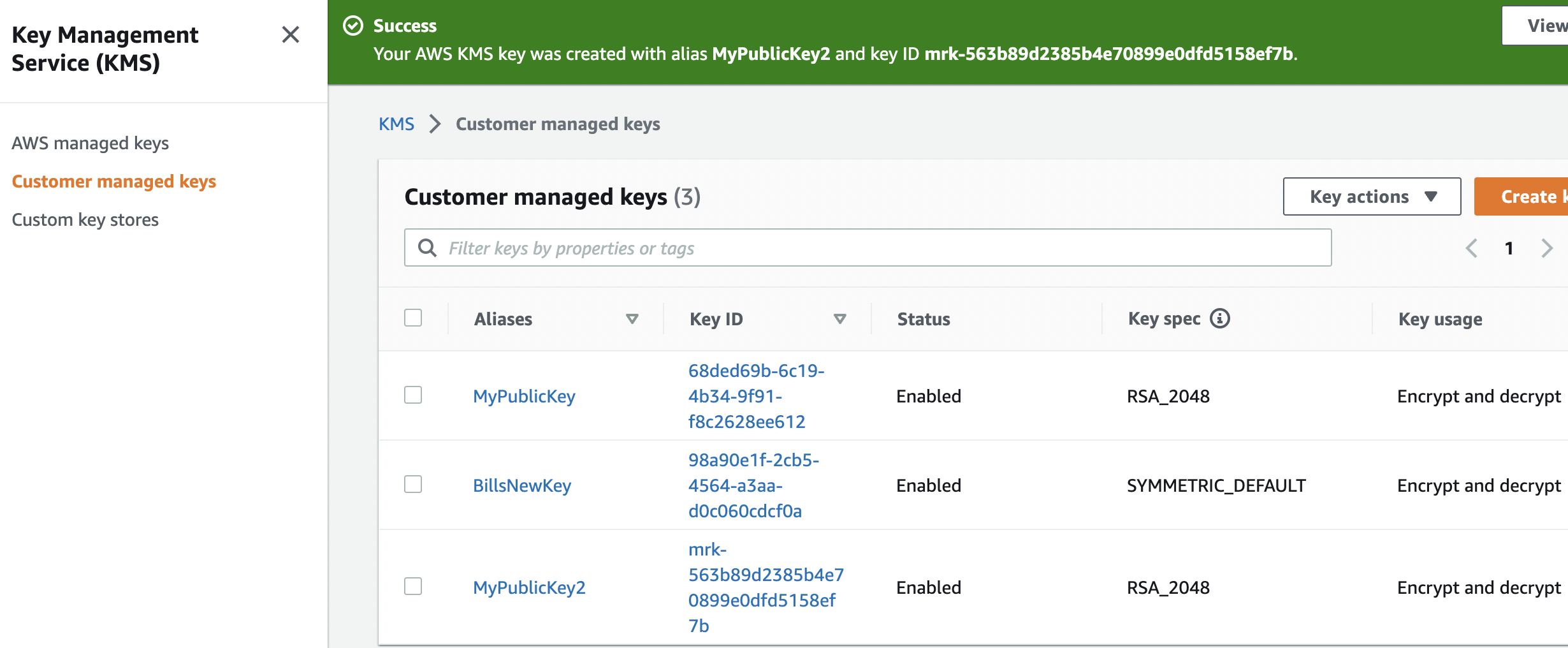
and then create the key:
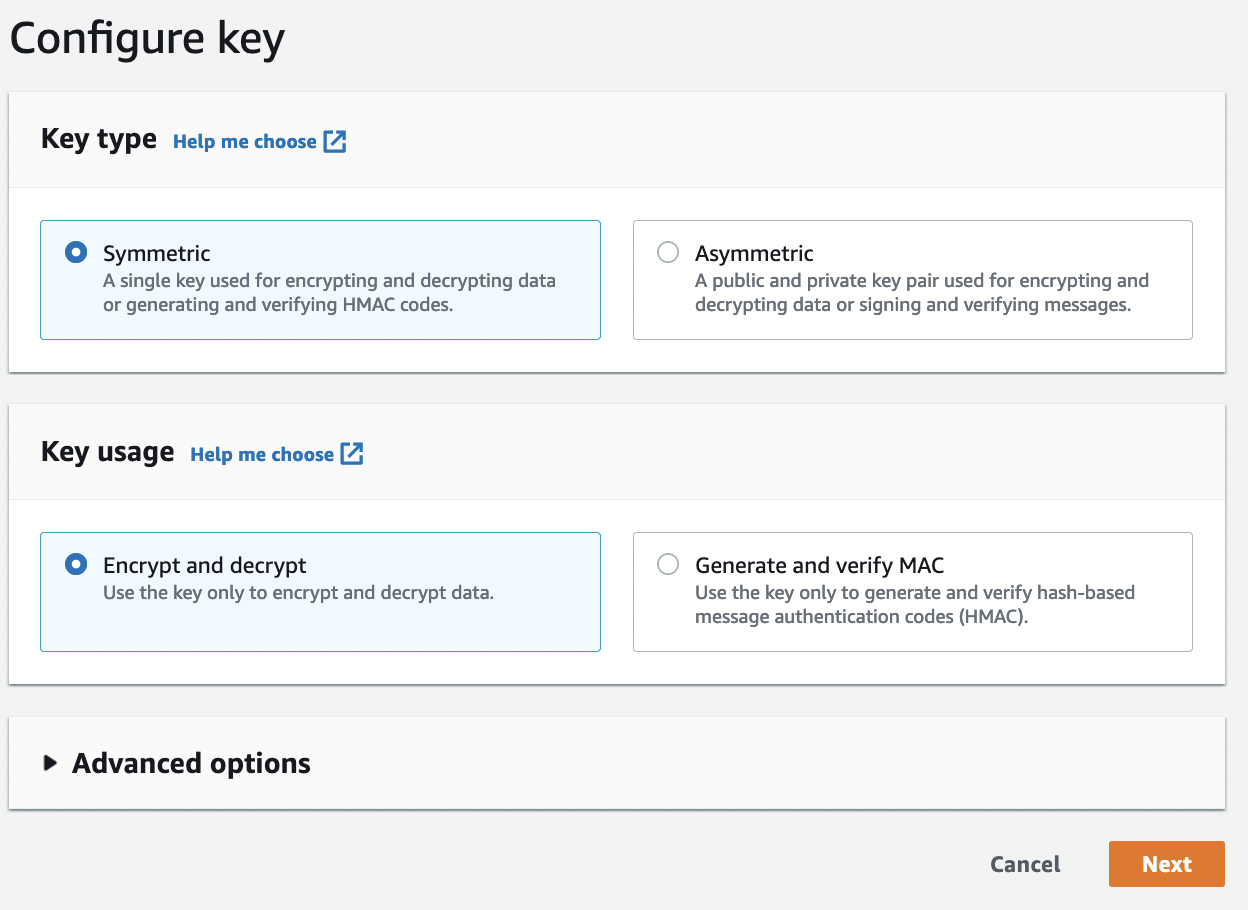
Next, we give it a name:
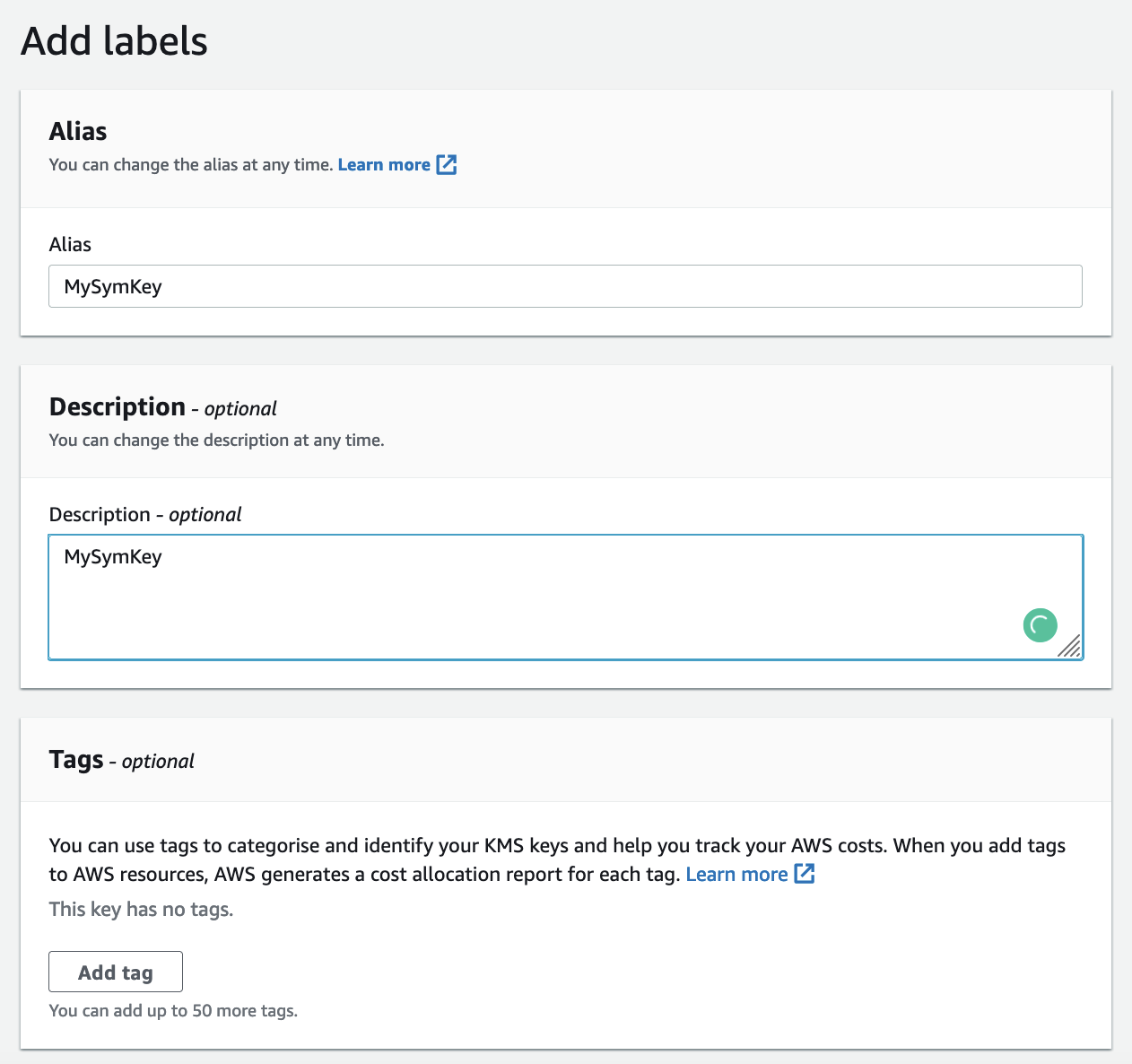
And then define the administrative permission (those who can delete it):
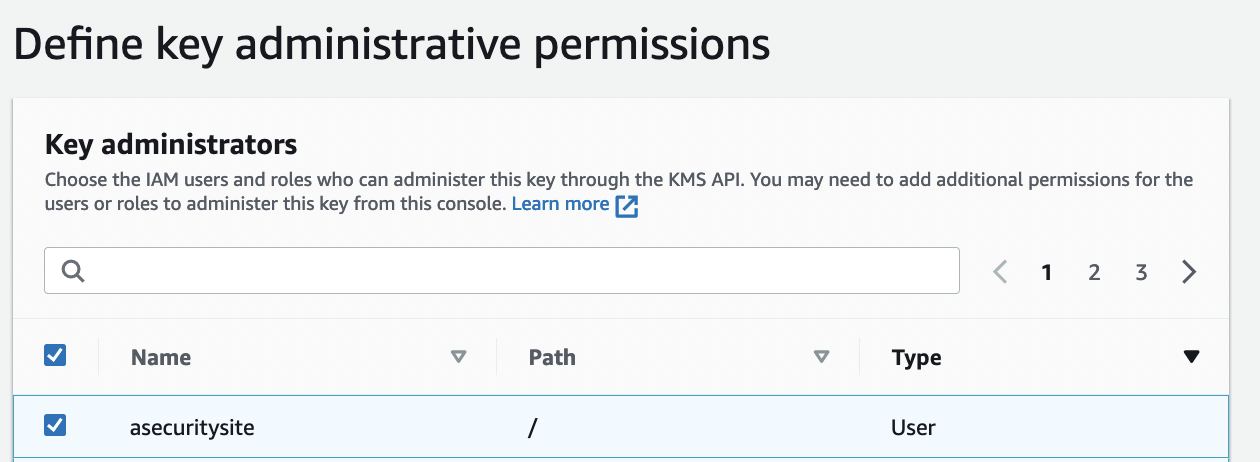
And the usage:
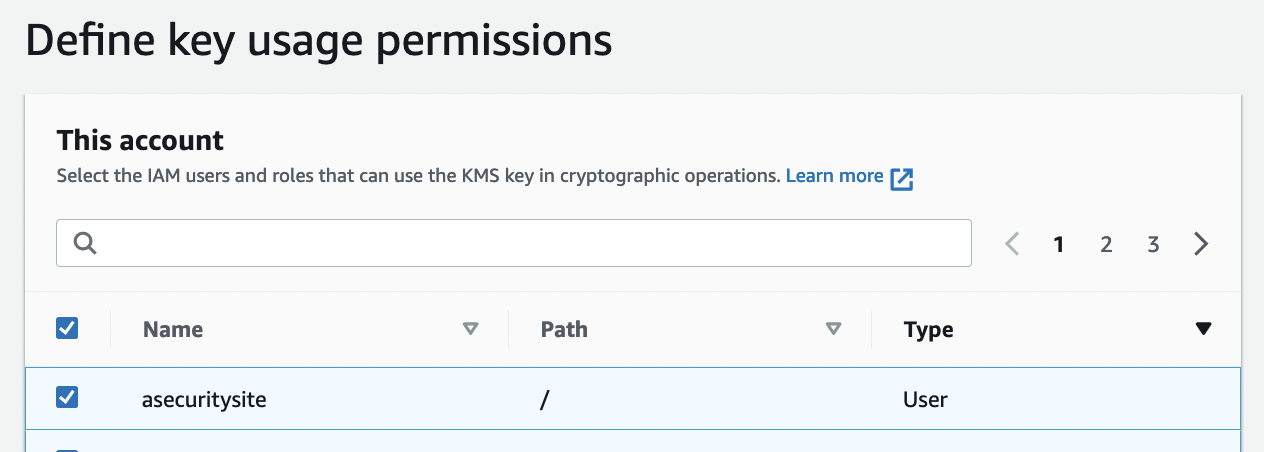
The policy is then:
{
    "Id": "key-consolepolicy-3",
    "Version": "2012-10-17",
    "Statement": [
        {
            "Sid": "Enable IAM User Permissions",
            "Effect": "Allow",
            "Principal": {
                "AWS": "arn:aws:iam::22222222:root"
            },
            "Action": "kms:*",
            "Resource": "*"
        },
        {
            "Sid": "Allow access for Key Administrators",
            "Effect": "Allow",
            "Principal": {
                "AWS": [
                    "arn:aws:iam::22222222:role/LabRole",
                    "arn:aws:iam::22222222:role/aws-service-role/trustedadvisor.amazonaws.com/AWSServiceRoleForTrustedAdvisor",
                    "arn:aws:iam::22222222:role/aws-service-role/events.amazonaws.com/AWSServiceRoleForCloudWatchEvents",
                    "arn:aws:iam::22222222:role/EMR_EC2_DefaultRole",
                    "arn:aws:iam::22222222:role/aws-service-role/elasticache.amazonaws.com/AWSServiceRoleForElastiCache",
                    "arn:aws:iam::22222222:role/aws-service-role/organizations.amazonaws.com/AWSServiceRoleForOrganizations",
                    "arn:aws:iam::22222222:role/EMR_DefaultRole",
                    "arn:aws:iam::22222222:role/EMR_AutoScaling_DefaultRole",
                    "arn:aws:iam::22222222:role/aws-service-role/cloud9.amazonaws.com/AWSServiceRoleForAWSCloud9",
                    "arn:aws:iam::22222222:role/aws-service-role/support.amazonaws.com/AWSServiceRoleForSupport"
                ]
            },
            "Action": [
                "kms:Create*",
                "kms:Describe*",
                "kms:Enable*",
                "kms:List*",
                "kms:Put*",
                "kms:Update*",
                "kms:Revoke*",
                "kms:Disable*",
                "kms:Get*",
                "kms:Delete*",
                "kms:TagResource",
                "kms:UntagResource",
                "kms:ScheduleKeyDeletion",
                "kms:CancelKeyDeletion"
            ],
            "Resource": "*"
        },
        {
            "Sid": "Allow use of the key",
            "Effect": "Allow",
            "Principal": {
                "AWS": [
                    "arn:aws:iam::22222222:role/LabRole",
                    "arn:aws:iam::22222222:role/aws-service-role/trustedadvisor.amazonaws.com/AWSServiceRoleForTrustedAdvisor",
                    "arn:aws:iam::22222222:role/aws-service-role/events.amazonaws.com/AWSServiceRoleForCloudWatchEvents",
                    "arn:aws:iam::22222222:role/EMR_EC2_DefaultRole",
                    "arn:aws:iam::22222222:role/aws-service-role/elasticache.amazonaws.com/AWSServiceRoleForElastiCache",
                    "arn:aws:iam::22222222:role/aws-service-role/organizations.amazonaws.com/AWSServiceRoleForOrganizations",
                    "arn:aws:iam::22222222:role/EMR_DefaultRole",
                    "arn:aws:iam::22222222:role/EMR_AutoScaling_DefaultRole",
                    "arn:aws:iam::22222222:role/aws-service-role/cloud9.amazonaws.com/AWSServiceRoleForAWSCloud9",
                    "arn:aws:iam::22222222:role/aws-service-role/support.amazonaws.com/AWSServiceRoleForSupport"
                ]
            },
            "Action": [
                "kms:Encrypt",
                "kms:Decrypt",
                "kms:ReEncrypt*",
                "kms:GenerateDataKey*",
                "kms:DescribeKey"
            ],
            "Resource": "*"
        },
        {
            "Sid": "Allow attachment of persistent resources",
            "Effect": "Allow",
            "Principal": {
                "AWS": [
                    "arn:aws:iam::22222222:role/LabRole",
                    "arn:aws:iam::22222222:role/aws-service-role/trustedadvisor.amazonaws.com/AWSServiceRoleForTrustedAdvisor",
                    "arn:aws:iam::22222222:role/aws-service-role/events.amazonaws.com/AWSServiceRoleForCloudWatchEvents",
                    "arn:aws:iam::22222222:role/EMR_EC2_DefaultRole",
                    "arn:aws:iam::22222222:role/aws-service-role/elasticache.amazonaws.com/AWSServiceRoleForElastiCache",
                    "arn:aws:iam::22222222:role/aws-service-role/organizations.amazonaws.com/AWSServiceRoleForOrganizations",
                    "arn:aws:iam::22222222:role/EMR_DefaultRole",
                    "arn:aws:iam::22222222:role/EMR_AutoScaling_DefaultRole",
                    "arn:aws:iam::22222222:role/aws-service-role/cloud9.amazonaws.com/AWSServiceRoleForAWSCloud9",
                    "arn:aws:iam::22222222:role/aws-service-role/support.amazonaws.com/AWSServiceRoleForSupport"
                ]
            },
            "Action": [
                "kms:CreateGrant",
                "kms:ListGrants",
                "kms:RevokeGrant"
            ],
            "Resource": "*",
            "Condition": {
                "Bool": {
                    "kms:GrantIsForAWSResource": "true"
                }
            }
        }
    ]
}
AWS Encryption
Now we can create a file named 1.txt, and enter some text:
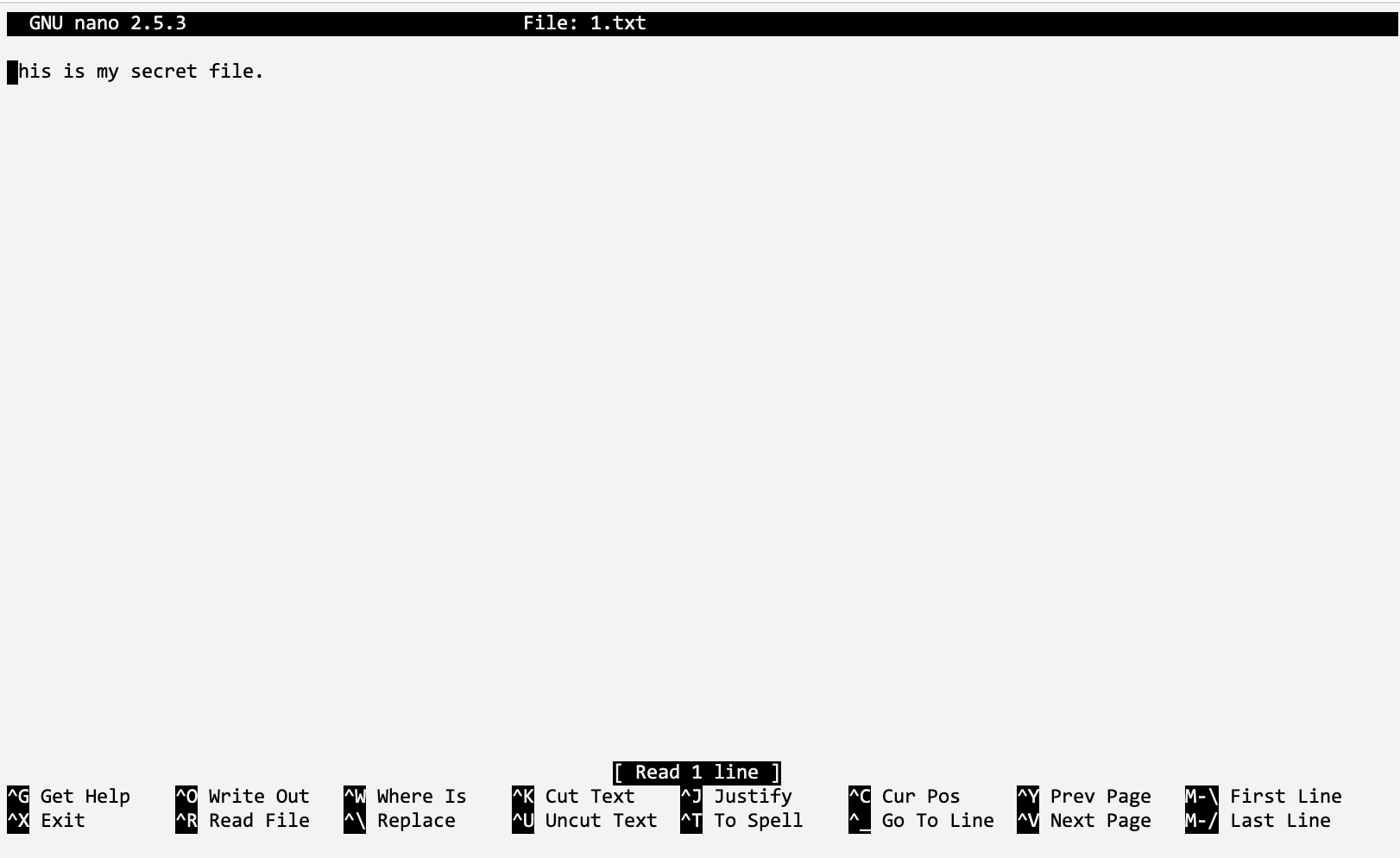 {width=50% }
Once we have this, we can then encrypt the file using the “aws kms encrypt” command, and then use “fileb://1.txt” to refer to the file:
aws kms encrypt  --key-id alias/MySymKey   --plaintext fileb://1.txt   --query CiphertextBlob --output text > 1.out
cat 1.out
This produces a ciphertext blob, and which is in Base64 format:
AQICAHgTBDpVTrBTrduWKdNnvMoMMUWjObqp+GqbghUx7qa6JwEQ7F2Fzubd+pcz3I06bFuLAAAAdjB0BgkqhkiG9w0BBwagZzBlAgEAMGAGCSqGSIb3DQEHATAeBglghkgBZQMEAS4wEQQMgl3vWRVPyL7KK3klAgEQgDP+dQ4KsqT94hiARF8zlybFAtXJJBIucc8M952KHmkJzBGQQP4f8YQQ70DELV97ZXizzME=
We could transmit this in Base64 format, but we need to convert it into a binary format for us to now decrypt it. For this we use the “Base64 -d” command:
$ base64 -i 1.out  --decode > 1.enc
$ cat 1.enc
The result is a binary output:
$ cat 1.enc
x:UNSۖ)g
00e0`  1`He.0']3܍:l[v0t *H
]YOȾ+y%3u
D_3&$.q
i        @@-_{exddd_v1_w_W3n_145559
Now we can decrypt this with our key, and using the command of:
$ aws kms decrypt --key-id alias/BillsNewKey --output text --query Plaintext --ciphertext-blob fileb://1.enc > 2.out
$ cat 2.out
The output of this is our secret message in Base64 format:
VGhpcyBpcyBteSBzZWNyZXQgZmlsZS4K
and now we can decode this into plaintext:
$ base64 -i 2.out  --decode
This is my secret file.
The commands we have used are:
aws kms encrypt  --key-id alias/BillsNewKey   --plaintext fileb://1.txt  --query CiphertextBlob --output text > 1.out
echo "== Ciphertext (Base64)"
cat 1.out
echo "== Ciphertext (Binary)"
base64 -i 1.out  --decode > 1.enc
cat 1.enc
aws kms decrypt --key-id alias/BillsNewKey --output text --query Plaintext --ciphertext-blob fileb://1.enc > 2.out
echo "== Plaintext (Base64)"
cat 2.out
echo "== Plaintext"
base64 -i 2.out  --decode
and the result of this is:
== Ciphertext (Base64)
AQICAHgTBDpVTrBTrduWKdNnvMoMMUWjObqp+GqbghUx7qa6JwEfz+s9z3e0Mw0tOzuB5LuYAAAAdjB0BgkqhkiG9w0BBwagZzBlAgEAMGAGCSqGSIb3DQEHATAeBglghkgBZQMEAS4wEQQMqqwXsxB5QlQGVqZWAgEQgDOyBv6KYg4wN2bU/ZKSJ+5opJXMrjQj9GGvuuD2/Jeto9Er5yS91/iCb896CzCSeqUYJeo=

== Ciphertext (Binary)
x:UNSۖ)g
00e0`v0t`He.0'=w*H
yBTVV3b07f'ḫ4#a+$oz
0z%

== Plaintext (Base64)
VGhpcyBpcyBteSBzZWNyZXQgZmlsZS4K

== Plaintext
This is my secret file.
Here’s a sample run in an AWS Foundation Lab environment:

Here’s a sample run in an AWS Foundation Lab environment:
Using Python
Along with using the CLI, we can create the encryption using Python. In the following we use the boto3 library, and have a key ID of “98a90e1f-2cb5–4564-a3aa-d0c060cdcf0a” and which is in the US-East-1 region:
import base64
import binascii
import boto3

AWS_REGION = 'us-east-1'

def enable_kms_key(key_ID):
    try:
        response = kms_client.enable_key(KeyId=key_ID)

    except ClientError:
        print('KMS Key not working')
        raise
    else:
        return response


def encrypt(secret, alias):
    try:
        ciphertext = kms_client.encrypt(KeyId=alias,Plaintext=bytes(secret, encoding='utf8'),
        )
    except ClientError:
        print('Problem with encryption.')
        raise
    else:
        return base64.b64encode(ciphertext["CiphertextBlob"])


def decrypt(ciphertext, alias):
    try:
        plain_text = kms_client.decrypt(KeyId=alias,CiphertextBlob=bytes(base64.b64decode(ciphertext)))
    except ClientError:
        print('Problem with decryption.')
        raise
    else:
        return plain_text['Plaintext']

kms_client = boto3.client("kms", region_name=AWS_REGION)

KEY_ID = '98a90e1f-2cb5-4564-a3aa-d0c060cdcf0a'
kms = enable_kms_key(KEY_ID)
print(f'KMS key ID {KEY_ID} ')
msg='Hello'
print(f"Plaintext: {msg}")

cipher=encrypt(msg,KEY_ID)
print(f"Cipher {cipher}")
plaintext=decrypt(cipher,KEY_ID)
print(f"Plain: {plaintext.decode()}")
Each of the steps is similar to our CLI approach. A sample run gives:
KMS key ID 98a90e1f-2cb5-4564-a3aa-d0c060cdcf0a
Plaintext: Hello
Cipher b'AQICAHgTBDpVTrBTrduWKdNnvMoMMUWjObqp+GqbghUx7qa6JwHH797e/TF4csEBEFNmjvD5AAAAYzBhBgkqhkiG9w0BBwagVDBSAgEAME0GCSqGSIb3DQEHATAeBglghkgBZQMEAS4wEQQMJf0xVfikbMLfLI6jAgEQgCDYBm2NvB/I2NMxGgSw8wuWA/p6c6Jjm19/wK4eVrLXUw=='
Plain: Hello
I Reflective questions
-
If we have five ‘a’ values (“aaaaa”). What will be the padding value used for 256-bit AES with CMS:
-
If we have six ‘a’ values (“aaaaaa”). What will be the hex values used for the plain text:
-
The following cipher text is 256-bit AES ECB for a number of spaces (0x20):
c3f791fad9f9392116b2d12c8f6c4b3dc3f791fad9f9392116b2d12c8f6c4b3dc3f791fad9f9392116b2d12c8f6c4b3dc3f791fad9f9392116b2d12c8f6c4b3da3c788929dd8a9022bf04ebf1c98a4e4
What can you observe from the cipher text:
What is the range that is possible for the number of spaces which have been used:
How might you crack a byte stream sequence like this:
- For ChaCha20, we only generate a key stream. How is the ciphertext then created:
What I should have learnt from this lab?
The key things learnt:
- How to encrypt and decrypt with symmetric key encryption, and where we use a passphrase to generate the encryption key.
- How padding is used within the encryption and decryption processes.
- The core difference between a block cipher and a stream cipher.
Notes
The code can be downloaded from:
git clone https://github.com/billbuchanan/appliedcrypto
If you need to update the code, go into the appliedcrypto folder, and run:
git pull
To install a Python library use:
pip install libname
To install a Node.js package, use:
npm install libname
Possible solutions
Have a look here